Blender Hair Curves - Project Heist

The next version of Blender, version Blender 3.3 LTS, is coming at the beginning of September 2022. At the moment I am testing the Alpha version to follow the developent of the new features of this version. As a LTS version, it will then receive bugfixes for 2 years, so it is a big milestone for development and production.

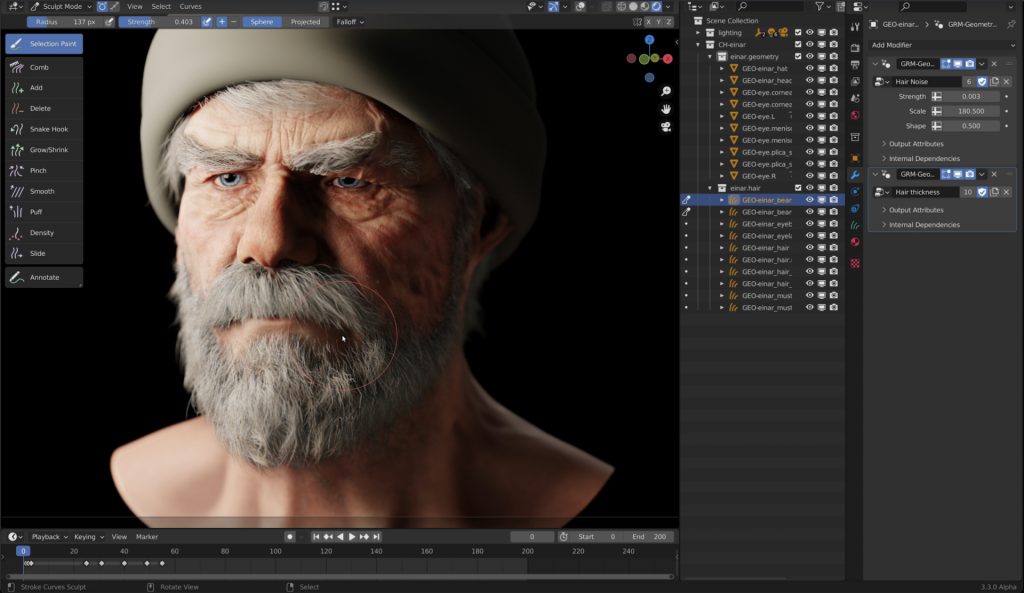
One of the most exciting features will be the new Hair system, which will be based on curves. The existing Hair system of Blender uses the Particle system, which is great, but also a little bit “old-school”.

Through geometry nodes it is possible to build your own geometry generators and procedural modifiers. Now with this new curve based approach for Hair you can build very easily procedural modifiers for Hair, for example you build only a basic Hair groom and then the Hair is filled procedurally and also reacts to weather conditions and wetness and so on by a modifier. This is awesome!

Andy Goralczyk from Blender Studio presents a new hair system for the upcoming Blender 3.3. The new hair system uses new high performance curves objects and combine the flexibility of Geometry Nodes with powerful destructive tools for hair grooming.

You find more information here in this article:
https://code.blender.org/2022/07/the-future-of-hair-grooming/

If you have any questions, please let me know. For Blender Trainings (remote, for companies and individuals please check www.pixeltrain.net or contact me directly under info(at)pixeltrain.net ).

Have a nice weekend,

Helge

Fusion for Production - VFX Compositing with Fusion - 03 Deep Pixel Fundamentals, Tools & Workflows

In this tutorial series, we will talk about Blackmagic Fusion Studio and Blackmagic DaVinci Resolve (Fusion page) as a professional VFX Compositing package. We will dive into basic workflows and techniques to make your daily compositing work more effective and fun.

In this tutorial, you will learn the Fundamentals of Fusions Deep Pixel workflows, which gives you as a compositing artist an extremely powerful toolset inside of Fusion. You will see which data channels are transported through the composition node flow as Deep Pixel information to help specialized Fusion tools / nodes to make operations like SSAO, Re-Lighting, Re-Texturing, Depth of Field, Vector MotionBlur, Depth Merging, Z-based Masking, ObjectIDs, MaterialIDs and much more. You will see how to generate them directly in the OpenGL renderer of Fusion from a 3D scene so that you can later use the same techniques with MultiChannel EXRs from other 3D packages like Blender, Maya and Houdini.

If you have questions or topics, which should be added, please let me know.

If you want to support me for publishing more free tutorials you could join my Patreons:
https://www.patreon.com/pixeltrain3d

or give me a fast Coffee time Tip:PayPal: https://paypal.me/pixeltrain
These topics are covered in this tutorial:

00:00 Overview of the series and the lesson
00:38 Deep Compositing in NUKEX vs Deep Pixel in Fusion
01:04 What is the Deep Pixel Approach?
04:20 Importing Data into Resolve
05:30 Generating a Fusion Comp inside Resolve
06:55 Bringing a Fusion Studio composition to DaVinci Resolve
08:37 Working with 3D-Scenes in Fusion
10:15 Renderer3D Node
13:12 Understanding Multichannel EXR channels
13:42 Channel mapping in Loaders and MediaIn
16:20 Setting Output Channels for Deep Pixel
17:00 Sampling channels in the Viewer
17:46 Z-Depth
19:31 Deep Pixel Tools / Nodes
19:59 Ambient Occlusion (SSAO) Tool
20:38 Normals
21:05 Settings and usage for Ambient Occlusion
24:12 Depth Blur Tool for Depth of Field
27:55 Fog Tool & Settings
29:03 Volume Fog Tool for Position-based Masking
30:00 World Position Pass
33:20 Using Volume Fog as a Mask
34:45 Z-Merge / Depth-based Merge operations
37:13 Motion Vectors & MotionBlur with the Vector Blur Tool
39:38 Working with ObjectID and MaterialID
42:21 ReLighting & Reflections with the Shader Tool
46:50 Re-Texturing with the Texture Tool
47:44 Understanding UVs / Texture Coordinates
48:45 Outro

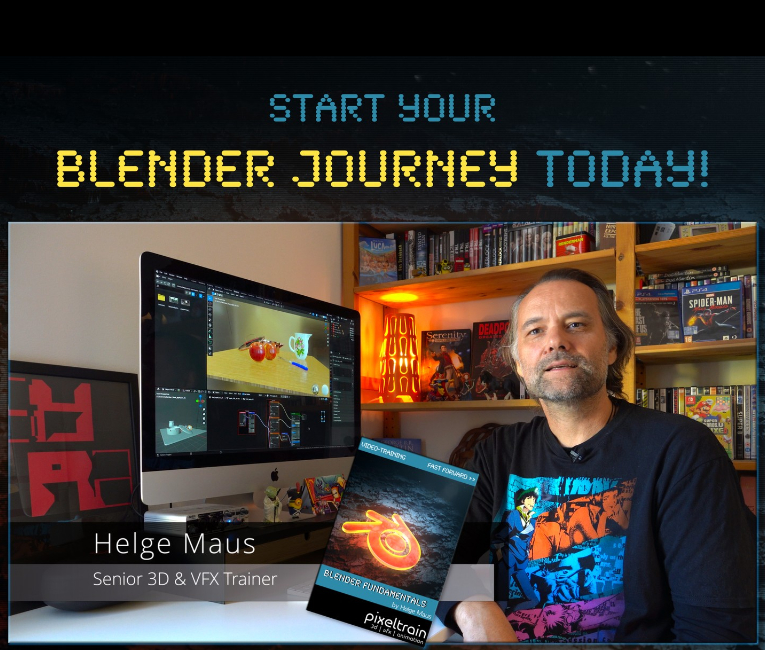
As a Senior 3D & VFX Trainer, Helge Maus teaches 3D- & VFX Applications for 20 years. His focus lies on VFX, but he also works with many studios and agencies from different visualization areas. He focuses on Houdini FX, Blender, and NUKE for his daily work and training.

Find more information on www.pixeltrain.net
YouTube: https://www.youtube.com/pixeltrain3DVFXTrainings
Twitter: https://twitter.com/pixeltrain
Blog: http://www.helgemaus.com
Mastodon: https://mastodon.art/web/@pixeltrain3d
Instagram: https://www.instagram.com/pixeltrain3d/
LinkedIn: https://www.linkedin.com/in/pixeltrain/
Artstation: https://www.artstation.com/pixeltrain

We have good news for everyone who wants to dive into Blender, learn the Fundamentals, and beyond.
Together with Visualisierungs-Akademie Schweiz GmbH, I will host another season of Blender online workshops in German language this summer.
Starting in June with 2 days of Blender Fundamentals, after that in July we have 2 days deep dive into Rendering in Cycles and Eevee and then in August 2022, we finish with another 2 days Animation and Rigging in Blender.

If you are interested, please check the following dates or just write me an email (info (at) hmaus.de).

Have a wonderful time!
Yours,
Helge

Introduction to Blender
June 23 + 24, 2022
– online –

in cooperation with Visualisierungsakademie Schweiz

On June 23 and 24 I will teach you online taking your first steps in Blender.

If you are interested, please check out the detailed information here:
https://visualisierungs-akademie.ch/bildung/blender-einfuehrungskurs/

On request I also teach this online course in English. Please do not hesitate to ask your questions (info(at) pixeltrain.net). I am always happy, to hear from everyone who is interested to become an Artist in Blender, Nuke or Houdini FX.

Some of the topics you learn in this course:

  • Getting to know the Blender 3.2 Infrastructure
  • Installation, AddOns and Konfiguration
  • User-Interface and Navigation
  • Scene-Organisation, Outlines, Collections
  • Polygone-Modeling Techniques
  • Working with Curves & Surfaces
  • Modifiers
  • SubDivision Surfaces
  • UV Editor
  • Lightening, Types of Lights, Previews
  • Camera & Physical Setting
  • Materials & Shader
  • Using Textures
  • Photorealism & PBR
  • Preview with Eevee (Realtime)
  • Using Shading Workspace
  • Rendersettings with Eevee and Cycles
  • Final Rendering
  • Simple Compositing in the Compositing Workspace
  • Introduction to Sculpting Workspace
  • First Keyframes and Animationen
  • Rendering of Animations

On request I also teach this online course in English. Please do not hesitate to ask your questions (info(at) pixeltrain.net). I am always happy, to hear from everyone who is interested to become an Artist in Blender, Nuke or Houdini FX.

If you have any questions, please write me on this adress: info (at) hmaus.de.

Hope to see you soon!

Rendering in Blender with Eevee and Cycles
July 14 + 15, 2022
– online –

in cooperation with Visualisierungsakademie Schweiz

On July 14 and 15 I give an Online-Training on Rendering in Blender -> https://visualisierungs-akademie.ch/bildung/blender-vertiefung/

Two days of intensive advanced training for everyone who wants to use Blender to create sophisticated materials and visualizations for architecture, product design, games & film.
In addition to photorealistic rendering, you will also learn techniques for non-photorealistic rendering for animation, motion design, manga, comics and architecture / product sketching.

Some of the topics you learn in this course:

  • Cycles Render-Engine for Photorealism
  • Physical Lighting and Cameras
  • Eevee for Realtime Rendering
  • Shader Editor
  • Building complex Shaders
  • Creating photorealistic Materials
  • Architecture- & Design Materials
  • Detail-Sculpting & Baking
  • PBR Workflows
  • Image-Finishing with the internal Compositor
  • Exchang with Photoshop, After Effects & NUKE
  • Internal Freestyle Renderer for Sketch & Toon
  • Creating Freestyle Materials
  • Creating Comic Shader
  • Refining Comic & Manga Stile in the Compositor

For further information, please visit this website:
https://visualisierungs-akademie.ch/bildung/blender-vertiefung/

On request I also teach this online course in English. Please do not hesitate to ask your questions (info(at) pixeltrain.net). I am always happy, to hear from everyone who is interested to become an Artist in Blender, Nuke or Houdini FX.

If you have any questions, please write me on this adress: info (at) hmaus.de

Blender Animation Training
August 18 + 19, 2022
– online –

in cooperation with Visualisierungsakademie Schweiz

On August 18 and 19 I give an Online-Training on Animation in Blender -> „Introduction to Animation and Rigging“

You learn how to work with the powerful Animation Tools of Blender. You get to know helpful add-ons for MotionGraphics and Rigging and you build your first technical and organic animation rigs. We bring camera animations to life and also learn how to export these animations for game engines like Unity, Unreal or Godot. You will get to know Timeline, Dopesheet, Graph Editor, NLA, Shapes and Drivers.

  • Wichtige Blender Konzepte für Animatoren & Rigger
  • Projekteinstellungen für Animation
  • Blender Timeline
  • Keying, Keying Sets & Autokeys
  • Channels & Keyframes im Dopesheet
  • Erstellen von Playblasts
  • Motion Path Tool
  • Graph Editor & F-Curves
  • Interpolation & Handles
  • Curves Modifiers
  • Channel Groups
  • Basics des Rigging
  • Armatures
  • Aufbau von Rigs für mechanische / organische Objekte
  • Bone Layers, Bone Groups & Bendy Bones
  • Binding Meshes & Weight-Painting
  • IK Setups
  • Poses
  • Shape Keys
  • Arbeiten mit Constraints
  • Drivers & Expressions
  • Action Editor & Blender’s Action System
  • NLA System
  • Arbeiten mit Audio
  • Basics des Grease Pencil

For further information, please visit this website:
https://visualisierungs-akademie.ch/bildung/blender-animation/


Find more information on www.pixeltrain.net

YouTube: https://www.youtube.com/pixeltrain3DVFXTrainings

Twitter: https://twitter.com/pixeltrain

Instagram: https://www.instagram.com/pixeltrain3d/

LinkedIn: https://www.linkedin.com/in/pixeltrain/

Artstation: https://www.artstation.com/pixeltrain

This spring I will again host three Blender Classes, an Introduction Course, a course about Rendering with Eevee and Cyles and the third class deals with Animation and Rigging in Blender.

If you are interested, please check the following dates or just write me an email (info (at) hmaus.de).

Have a wonderful spring!
Yours,
Helge

Rendering in Blender with Eevee and Cycles
February 24 + 25, 2022
– online –

in cooperation with Visualisierungsakademie Schweiz

On February 24 and 25 I give an Online-Training on Rendering in Blender -> https://visualisierungs-akademie.ch/bildung/blender-vertiefung/

Two days of intensive advanced training for everyone who wants to use Blender to create sophisticated materials and visualizations for architecture, product design, games & film.
In addition to photorealistic rendering, you will also learn techniques for non-photorealistic rendering for animation, motion design, manga, comics and architecture / product sketching.

Some of the topics you learn in this course:

  • Cycles Render-Engine for Photorealism
  • Physical Lighting and Cameras
  • Eevee for Realtime Rendering
  • Shader Editor
  • Building complex Shaders
  • Creating photorealistic Materials
  • Architecture- & Design Materials
  • Detail-Sculpting & Baking
  • PBR Workflows
  • Image-Finishing with the internal Compositor
  • Exchang with Photoshop, After Effects & NUKE
  • Internal Freestyle Renderer for Sketch & Toon
  • Creating Freestyle Materials
  • Creating Comic Shader
  • Refining Comic & Manga Stile in the Compositor

For further information, please visit this website:
https://visualisierungs-akademie.ch/bildung/blender-vertiefung/

On request I also teach this online course in English. Please do not hesitate to ask your questions (info(at) pixeltrain.net). I am always happy, to hear from everyone who is interested to become an Artist in Blender, Nuke or Houdini FX.

If you have any questions, please write me on this adress: info (at) hmaus.de

Blender Animation Training
March 7 + 8, 2022
– online –

in cooperation with Visualisierungsakademie Schweiz

On March 7 and 8 I give an Online-Training on Animation in Blender -> „Introduction to Animation and Rigging“

You learn how to work with the powerful Animation Tools of Blender. You get to know helpful add-ons for MotionGraphics and Rigging and you build your first technical and organic animation rigs. We bring camera animations to life and also learn how to export these animations for game engines like Unity, Unreal or Godot. You will get to know Timeline, Dopesheet, Graph Editor, NLA, Shapes and Drivers.

For further information, please visit this website:
https://visualisierungs-akademie.ch/bildung/blender-animation/

On request I also teach this online course in English. Please do not hesitate to ask your questions (info(at) pixeltrain.net). I am always happy, to hear from everyone who is interested to become an Artist in Blender, Nuke or Houdini FX.

If you have any questions, please write me on this adress: info (at) hmaus.de.

Hope to see you soon!

Introduction to Blender
April 13 + 14, 2022
– online –

in cooperation with Visualisierungsakademie Schweiz

On April 13 and 14 I will teach you online taking your first steps in Blender.

If you are interested, please check out the detailed information here:
https://visualisierungs-akademie.ch/bildung/blender-einfuehrungskurs/

On request I also teach this online course in English. Please do not hesitate to ask your questions (info(at) pixeltrain.net). I am always happy, to hear from everyone who is interested to become an Artist in Blender, Nuke or Houdini FX.

Some of the topics you learn in this course:

  • Getting to know the Blender 2.9 Infrastructure
  • Installation, AddOns and Konfiguration
  • User-Interface and Navigation
  • Scene-Organisation, Outlines, Collections
  • Polygone-Modeling Techniques
  • Working with Curves & Surfaces
  • Modifier
  • SubDivision Surfaces
  • UV Editor
  • Lightening, Types of Lights, Previews
  • Camera & Physical Setting
  • Materials & Shader
  • Using Textures
  • Photorealism & PBR
  • Preview with Eevee (Realtime)
  • Using Shading Workspace
  • Rendersettings with Eevee and Cycles
  • Final Rendering
  • Simple Compositing in the Compositing Workspace
  • Introduction to Sculpting Workspace
  • First Keyframes and Animationen
  • Rendering of Animations

Find more information on www.pixeltrain.net

YouTube: https://www.youtube.com/pixeltrain3DVFXTrainings

Twitter: https://twitter.com/pixeltrain

Instagram: https://www.instagram.com/pixeltrain3d/

LinkedIn: https://www.linkedin.com/in/pixeltrain/

Artstation: https://www.artstation.com/pixeltrain

Thanks to the new USD export in Blender, the exchange between Blender’s powerful motion tracker and NUKE or Houdini is becoming easier and easier. Blender is becoming more and more team-minded – thanks to the developers.

My upcoming Blender free tutorial series offers a deep dive into camera and object tracking.

More information then on YouTube. Coming soon: https://www.youtube.com/pixeltrain3DVFXTrainings


If you like Helge’s Tutorials, give him some support to go on!

If you want to support Helge Maus for publishing more free tutorials, you can join his Patreons:
https://www.patreon.com/pixeltrain3d

Or if you want to buy me a coffee or pizza, here’s my Tip Jar:
https://www.paypal.com/donate/?hosted_button_id=72PHXB852BW5A

Thanks for your support!


Find more information on www.pixeltrain.net

YouTube: https://www.youtube.com/pixeltrain3DVFXTrainings

LinkedIn: linkedin.com/in/pixeltrain

Artstation: https://www.artstation.com/pixeltrain

Instagram: https://www.instagram.com/pixeltrain3d/

We have good news for everyone who wants to dive into Blender, learn the Fundamentals, and beyond.

Together with Visualisierungs-Akademie Schweiz GmbH, I will host another season of Blender online workshops in the next weeks.

Starting in November with 2 days of Blender Fundamentals, after that in December we have 2 days deep dive into Animation and Rigging and then in January 2022, we finish with another 2 days Rendering in Cycles, Eevee and NPR.


As said, these workshops are in german language BUT, English is planed now. More information on that in the next days.

So keep in touch 🙂

Find more information on www.pixeltrain.net

YouTube: https://www.youtube.com/pixeltrain3DVFXTrainings

Patreon: https://www.patreon.com/pixeltrain3d

VIMEO: vimeo.com/pixeltrain

LinkedIn: linkedin.com/in/pixeltrain

Artstation: https://www.artstation.com/pixeltrain

Instagram: https://www.instagram.com/pixeltrain3d/

Twitter: https://twitter.com/pixeltrain

>> Introduction to Blender | Visualisierungsakademie Schweiz, September 2021

On September 16 and 17 I will teach you online taking your first steps in Blender.
If you are interested, please check out the detailed information here:
https://visualisierungs-akademie.ch/bildung/blender-einfuehrungskurs/

On request I also teach this online course in English. Please do not hesitate to ask your questions (info(at) pixeltrain.net). I am always happy, to hear from everyone who is interested to become an Artist in Blender, Nuke or Houdini FX.

Some of the topics you learn in this course:

  • Getting to know the Blender 2.9 Infrastructure
  • Installation, AddOns and Konfiguration
  • User-Interface and Navigation
  • Scene-Organisation, Outlines, Collections
  • Polygone-Modeling Techniques
  • Working with Curves & Surfaces
  • Modifier
  • SubDivision Surfaces
  • UV Editor
  • Lightening, Types of Lights, Previews
  • Camera & Physical Setting
  • Materials & Shader
  • Using Textures
  • Photorealism & PBR
  • Preview with Eevee (Realtime)
  • Using Shading Workspace
  • Rendersettings with Eevee and Cycles
  • Final Rendering
  • Simple Compositing in the Compositing Workspace
  • Introduction to Sculpting Workspace
  • First Keyframes and Animationen
  • Rendering of Animations
>> Blender Online-Training – Rendering with Eevee and Cycles | Visualisierungsakademie Schweiz, October 2021

On October 7 and 8 I give an Online-Training on Rendering in Blender -> https://visualisierungs-akademie.ch/bildung/blender-vertiefung/

Two days of intensive advanced training for everyone who wants to use Blender to create sophisticated materials and visualizations for architecture, product design, games & film.
In addition to photorealistic rendering, you will also learn techniques for non-photorealistic rendering for animation, motion design, manga, comics and architecture / product sketching.

Some of the topics you learn in this course:

  • Cycles Render-Engine for Photorealism
  • Physical Lighting and Cameras
  • Eevee for Realtime Rendering
  • Shader Editor
  • Building complex Shaders
  • Creating photorealistic Materials
  • Architecture- & Design Materials
  • Detail-Sculpting & Baking
  • PBR Workflows
  • Image-Finishing with the internal Compositor
  • Exchang with Photoshop, After Effects & NUKE
  • Internal Freestyle Renderer for Sketch & Toon
  • Creating Freestyle Materials
  • Creating Comic Shader
  • Refining Comic & Manga Stile in the Compositor

For further information, please visit this website:
https://visualisierungs-akademie.ch/bildung/blender-vertiefung/

On request I also teach this online course in English. Please do not hesitate to ask your questions (info(at) pixeltrain.net). I am always happy, to hear from everyone who is interested to become an Artist in Blender, Nuke or Houdini FX.

If you have any questions, please write me on this adress: info (at) pixeltrain.net.

>> Blender Animation Training | Visualisierungsakademie Schweiz, October 2021

On October 14 and 15 I give an Online-Training on Animation in Blender -> „Introduction to Animation and Rigging“

You learn how to work with the powerful Animation Tools of Blender. You get to know helpful add-ons for MotionGraphics and Rigging and you build your first technical and organic animation rigs. We bring camera animations to life and also learn how to export these animations for game engines like Unity, Unreal or Godot. You will get to know Timeline, Dopesheet, Graph Editor, NLA, Shapes and Drivers.

For further information, please visit this website:
https://visualisierungs-akademie.ch/bildung/blender-animation/

On request I also teach this online course in English. Please do not hesitate to ask your questions (info(at) pixeltrain.net). I am always happy, to hear from everyone who is interested to become an Artist in Blender, Nuke or Houdini FX.

If you have any questions, please write me on this adress: info (at) pixeltrain.net.

Hope to see you soon!

Yours,
Helge

Find more information on www.pixeltrain.net

YouTube: https://www.youtube.com/pixeltrain3DVFXTrainings

VIMEO: vimeo.com/pixeltrain

Patreon: https://www.patreon.com/pixeltrain3d

LinkedIn: linkedin.com/in/pixeltrain

Artstation: https://www.artstation.com/pixeltrain

Instagram: https://www.instagram.com/pixeltrain3d/

Twitter: https://twitter.com/pixeltrain

Here are the new features:

https://www.blender.org/download/releases/2-93/

And the cool new features reel:

https://youtu.be/fxNlpQYRz7s

Such a great final release for Blender 2+ series – now the Blender 3 can come!

Thanks to all the great developers!

P.S. If you want to start now, my next Blender Animation & Rigging Training (German) is June 17 + 18, 2021.

More information: http://www.pixeltrain.net/events/


If you like Helge’s Tutorials, give him some support to go on!

If you want to support Helge Maus for publishing more free tutorials, you can join his Patreons:
https://www.patreon.com/pixeltrain3d

Or if you want to buy me a coffee or pizza, here’s my Tip Jar:
https://www.paypal.com/donate/?hosted_button_id=72PHXB852BW5A

Thanks for your support!


Find more information on www.pixeltrain.net

YouTube: https://www.youtube.com/pixeltrain3DVFXTrainings

VIMEO: vimeo.com/pixeltrain

LinkedIn: linkedin.com/in/pixeltrain

Artstation: https://www.artstation.com/pixeltrain

Instagram: https://www.instagram.com/pixeltrain3d/

Twitter: https://twitter.com/pixeltrain

As many of you know, I am a huge fan of Blender. I’m convinced that this free software will be a new industry standard for many visualization and animation projects in the future.

I use Blender with Houdini FX in my trainings and also for personal projects all the time. Besides Cycles and Eevee I am also using LuxCore Renderer for photorealistic rendering with deep ray counts, complex camera effects and light linking. It’s best suited for Architecture, Product Visualization, and many more chases when it comes to realism.

The featureset is great!
And best of all it supports CPU and GPU (also on Mac with AMD cards).

Version 2.5 was just released, take a look here: https://luxcorerender.org

Thanks to the development team!


Here is my YouTube for all my tutorials about Houdini, Blender, Nuke & more:
https://www.youtube.com/pixeltrain3DVFXTrainings

BTW, if you want to support my work with these free tutorials, please subscribe to my YouTube channel, give me a ThumbsUp for the content you like. Also, I have a Patreon page, starting with $1 per month. That’s a nice way to say “Thank You”:
https://www.patreon.com/pixeltrain3d


If you like Helge’s Tutorials, give him some support to go on!

If you want to support Helge Maus for publishing more free tutorials, you can join his Patreons:
https://www.patreon.com/pixeltrain3d

Or if you want to buy me a coffee or pizza, here’s my Tip Jar:
https://www.paypal.com/donate/?hosted_button_id=72PHXB852BW5A

Thanks for your support!


Find more information on www.pixeltrain.net

YouTube: https://www.youtube.com/pixeltrain3DVFXTrainings

VIMEO: vimeo.com/pixeltrain

LinkedIn: linkedin.com/in/pixeltrain

Artstation: https://www.artstation.com/pixeltrain

Instagram: https://www.instagram.com/pixeltrain3d/

Twitter: https://twitter.com/pixeltrain

Here is a new tutorial for my series “Blender for Production“.

This time we will talk about an exciting software combination because we start setting up a Blender to NUKE pipeline. YES – Blender is an excellent choice as a 3d application and so it is important to learn how to use it together with Nuke in a compositing pipeline. This series has three parts.

These are the topics:

  • How to set up a Blender to Nuke-Pipeline
  • How to compose the Light Passes from Blender Cycles inside of NUKE
  • How to get a correct World Position Pass. You learn how to fix all the issues which will appear if you try to use a Blender Cycles WPP in NUKE directly. You learn to solve the problems in NUKE, but also in Blender, so you later have a deep understanding of the workflow and solutions. As always we then build our tools for a later production pipeline.

Have fun!
Helge

01 Setting up a Blender to Nuke Pipeline

02 Working with Blender Light Passes in Nuke

03 Building correct World Position Passes and custom AOVS

Here is my YouTube for all my tutorials about Houdini, Blender, Nuke & more:
https://www.youtube.com/pixeltrain3DVFXTrainings

BTW, if you want to support my work with these free tutorials, please subscribe to my YouTube channel, give me a ThumbsUp for the content you like. Also, I have a Patreon page, starting with $1 per month. That’s a nice way to say “Thank You”:
https://www.patreon.com/pixeltrain3d


If you like Helge’s Tutorials, give him some support to go on!

If you want to support Helge Maus for publishing more free tutorials, you can join his Patreons:
https://www.patreon.com/pixeltrain3d

Or if you want to buy me a coffee or pizza, here’s my Tip Jar:
https://www.paypal.com/donate/?hosted_button_id=72PHXB852BW5A

Thanks for your support!


Find more information on www.pixeltrain.net

YouTube: https://www.youtube.com/pixeltrain3DVFXTrainings

VIMEO: vimeo.com/pixeltrain

LinkedIn: linkedin.com/in/pixeltrain

Artstation: https://www.artstation.com/pixeltrain

Instagram: https://www.instagram.com/pixeltrain3d/

Twitter: https://twitter.com/pixeltrain