


Yesterday was officially my first day at work and I would therefore like to wish you all a healthy, successful and happy year 2025. All the best for you personally and for your creative projects 🎨!
Like last year, I published my annual planning and a few thoughts on my (free) Patreon
👉 https://www.patreon.com/posts/lets-talk-about-119489745?utm_medium=clipboard_copy&utm_source=copyLink&utm_campaign=postshare_creator&utm_content=join_link
Have fun!
Helge

Let’s go into a successful and creative year 2025.
If you want to learn Blender in a structured and practice-proven way, then I would like to introduce you to our pixeltrain Blender Academy.
With our module course system you build your own learning path tailored to your needs. The modules can be booked separately according to needs and prior knowledge.
pixeltrain’s Academy is characterized by small learning groups, well-structured units while keeping room to meet the needs of each individual.
All sessions are held live by Senior 3D & VFX trainer Helge Maus.
Module 1: Blender Fundamentals
20.+21. Jan.’25
27.+28. Jan.’25
Module 2: Blender Shading & Rendering
10.+11. Feb.’25
17.+18. Feb.’25
Module 3: Blender Animation & Rigging System
10.+11. Mar.’25
17.+18. Mar.’25
What’s included?
– Each module consists of 4 live sessions with a total length of 16 hours (4 x 4 hours)
– Each module takes two weeks with two sessions each week (Tuesday + Wednesday)
– Live sessions + downloadable recordings of each session
– Exercises + feedback
– Private discord channel for the students
Information and registration:
👉 https://www.pixeltrain.net/pixeltrains-academy/
If you have any questions, please let me know 🙂
Are you a fan of NPR Rendering or Anime in Blender? Big things are coming to Blender.

I’ve written a short article on my (free) Patreon about that:
Have fun!
Helge
Finally the new Godot Engine showreel for 2024 is out and and shows the work of so many talented and motivated game developers. Amazing!
👉 https://youtu.be/n1Lon_Q2T18?si=oAbSIvFzgT2-g-kC
Keep in mind that there are many, many more games out there made with Godot. This is only the tip of the iceberg. Thanks to all the developers and supporters of this amazing free and open-source game engine.
And, if you are interested, here is the link to the last showreel for 2023:
👉 https://youtu.be/W1_zKxYEP6Q?si=m655Vn92Rqyjgj4C
Have fun,
Helge
BTW, if you are looking for a remote company training for Game Development with the Godot Engine please reach out to me ( info(at)pixeltrain.net ):
http://www.pixeltrain.net/godot/
We also offer German online classes in cooperation with Visualisierungs-Akademie Schweiz:
http://www.pixeltrain.net/events/

Yesterday was a big day for all Godot Engine game developers working on 3d games using physics.
Since yesterday the Jolt Physics Engine was added as an alternative 3D Physics Engine to the source code of the coming Godot 4.4 version.
A little bit of background for that:
The stable version of Godot has it’s own 3d physics engine, which is used for all kinds of physics simulation in 3d games. These types of engines are really tricky to maintain, also to make their simulations performant and stable and also give you all the features your need.

(Image credit: Horizon Forbidden West by Guerrilla Games)
Many developers using Godot for 3D with heavy use of physics are working with an external open source physics engine with the name “Jolt”. This engine is written / maintained by Jorrit Rouwe and many other contributors and is battle-proofed, because it is used in “Horizon Forbidden West” by Guerrilla Games. It is suitable for games and VR applications.
The Jolt Physics Engine is a multi core friendly rigid body physics and collision detection library. Written in C++. Suitable for games and VR applications.
You can read more about this engine here:
https://github.com/jrouwe/JoltPhysics
Before yesterday devs wanting to use this engine had to use “Godot Jolt” an Godot extension that integrates the Jolt physics engine. This was a separate extension you had to install.
Now this code was integrated and re-written. Here the statement of Mikael Hermansson, the developer behind the extension:
This new module is a port of the Godot Jolt extension, developed by myself over the past two years, in large part as a personal project, but with the last year (including this port) being sponsored by W4 Games. I’ve also received a significant amount of assistance and contributions from @jrouwe during this development, which I’m very grateful for. In fact, several major features have been added to Jolt largely to cater to the needs of Godot.
Here the full thread of the merge into Godot 4.4:
https://github.com/godotengine/godot/pull/99895
So, I’m looking forward to Godot’s future as a full fleshed and performant 3D Games Engine.
Have fun!
Helge
BTW, if you want to learn Godot from the ground up I offer some German classes in beginning of 2025: http://www.pixeltrain.net/events/
Also I’m planing a pixeltrain Godot Academy in English beginning next year.
If you are interested, please let me know.

Today another development snapshot of the coming Godot version 4.4 is out.
👉 https://godotengine.org/article/dev-snapshot-godot-4-4-dev-6/
So for everyone who wants to play with the new version or test some features you can now download this version from the Godot’s website:
👉 https://godotengine.org/
Beside of the many, many small improvements and bugfixes there are also again some new features adding to the others which were added in the dev snapshots for Godot 4.4 before.
If you are interested to follow my thoughts, news, and tutorials about Godot and Blender, you find them also on my (free) Patreon:
👉 https://www.patreon.com/posts/godot-4-4-dev-6-117431569?utm_medium=clipboard_copy&utm_source=copyLink&utm_campaign=postshare_creator&utm_content=join_link
Have fun!

You are looking for an online class for your Blender Learning Path with a well structured curriculum? With our module course system you build your own learning path tailored to your needs. You can book only one or two or all the modules, however you want 🙂
pixeltrain’s Academy is characterized by small learning groups, well-structured units while keeping room to meet the needs of each individual.
All sessions are held live by Senior 3D & VFX trainer Helge Maus.
Module 1: Blender Fundamentals
20.+21. Jan. ’25
27.+28. Jan. ’25
Module 2: Blender Shading & Rendering
10.+11. Feb. ’25
17.+18. Feb. ’25
Module 3: Blender Animation & Rigging System
10.+11. Mar. ’25
17.+18. Mar. ’25
What we offer:
– Each module consists of 4 live sessions with a total length of 16 hours (4 x 4 hours)
– Each module takes two weeks with two sessions each week (Tuesday + Wednesday)
– Live sessions + downloadable recordings of each session
– Exercises + feedback
– Private discord channel for the students
Information and registration:
👉 https://www.pixeltrain.net/pixeltrains-academy/
If you have any questions, please let me know 🙂
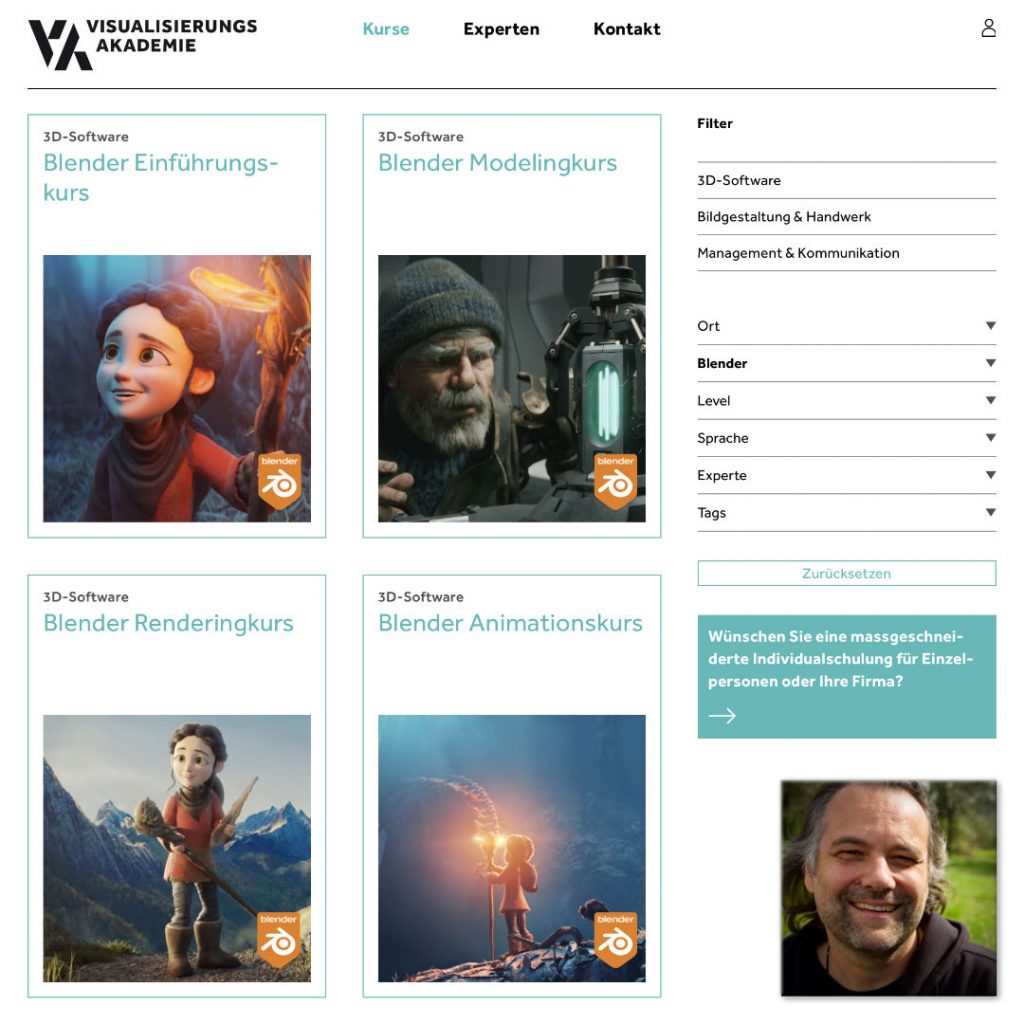
The last Blender training courses for this year still have a few seats available. I’m looking forward to help you deepen your Blender production knowlege.
These trainings are delivered in person by Senior Trainer & Mentor Helge Maus.
Helge teaches 3D-, VFX & Game software and workflows for over 20 years.
If you are interested in an individual Blender or Godot Game Engine training with Helge Maus, you can reach us by email info(at)pixeltrain.net.
Blender – Shading, Lighting & Rendering
Nov. 28.+29, online, German language
👉 https://visualisierungs-akademie.ch/de/kurs/blender-renderingkurs/98514946-325f-4818-bcdb-4f6b351a490b
Two days of intensive training for everyone who wants to use Blender to create sophisticated materials, shaders and visualizations for architecture, product design, games & film. In addition to photorealistic rendering, you will also learn techniques for non-photorealistic rendering for animation, motion design, manga, comics and architecture.
Blender – Animation & Rigging
Dec. 05.+06, online, German language
👉 https://visualisierungs-akademie.ch/de/kurs/blender-animationskurs/68ff897c-f766-4119-bea3-9f3422704d2f
Learn the powerful Blender animation system from scratch. Immerse yourself in the various editors such as Dopesheet, Curves and NLA and learn how to bring your scenes to life. We also dive into the exciting world of rigging in Blender. Learn about organic and non-organic rigging, as well as the powerful built-in add-on Rigify.
P.S. If you are looking for these training in English or for your company, please reach out to me. Let’s talk!

Möchtest Du lernen wie man 2D- oder 3D-Spiele in der freien open-source Godot Game Engine entwickelt? Dann möchte ich Euch heute stolz zwei neue Trainings in Zusammenarbeit mit der Visualisierungs-Akademie Schweiz GmbH vorstellen.
Wir haben nun zwei aufeinander aufbauenende Kurse (live online, in Deutsch) im Programm.
Ich freue mich schon so, mit Euch zu arbeiten:
Godot Einführungskurs – Game-Entwicklung für 2D & 3D
👉 https://visualisierungs-akademie.ch/de/kurs/godot-einfuhrungskurs/110d03e5-680d-414d-9521-7d46567f0712
Godot – Aufbaukurs – 3D Games entwickeln
👉 https://visualisierungs-akademie.ch/de/kurs/godot-vertiefungskurs/7ad00bcc-eb9e-41b6-9981-b7f7d049bf12
Bei Fragen zu diesen Kursen stehe ich jederzeit bereit.
Helge
— english —
Do you want to learn developing 2D- or 3D-Games in the free and open-source Godot Engine? Today I’m proud to present two new online training courses (2 days, live, in German) in our curriculum:
Godot Introduction to 2D & 3D Game Development
👉 https://visualisierungs-akademie.ch/de/kurs/godot-einfuhrungskurs/110d03e5-680d-414d-9521-7d46567f0712
Godot Advanced – 3D Game Development
👉 https://visualisierungs-akademie.ch/de/kurs/godot-vertiefungskurs/7ad00bcc-eb9e-41b6-9981-b7f7d049bf12
As these trainings are in German feel free to contact me if you are looking for the same content in English.

I’ve released a new Blender tutorial on YouTube. In this tutorial we will talk about the work with instanced collections in production, why they are so important but also which problems will come up if you don’t organize them correctly. We talk about some strategies to find the source collection of the instances in one scene, but also when they are linked from the outside. Then we look into a great free add-on / extension with the name „Edit Instanced Collection“, which helps you to modify the content of a collection easily.
You find the add-on here:
https://github.com/SuperFLEB/BlenderEditCollectionAddon
These topics are covered in this tutorial:
00:00 Helge Introduction
00:38 Introduction of instanced collections in production
01:20 Explanation of instanced collections
03:08 How to instance them
04:05 Object Data & Object Data Properties
05:02 Solutions of finding the source collection
07:57 Installation of add-on „Edit instanced Collection“
09:21 Generate a temp scene with the instanced content
10:22 Modifying the source of a collection
11:39 Changing all the instanced collections
13:00 Wrapping up
As a Senior 3D & VFX Trainer, Helge Maus teaches 3D- & VFX Applications for over 20 years.
His focus lies on Generalist work for VFX and Games. He works with studios, agencies and freelancers from different visualization areas and from the games industry.
Meanwhile he focuses on Blender, Unity, Godot & Fusion for his daily work and training. His strong industry background in teaching Houdini FX, Nuke, and Maya over many years helps him to train artists from the industry within a wide production context.
If you have questions or topics, which should be added, please let me know.
If you want to support me for publishing more free tutorials you could join my Patreons:
https://www.patreon.com/pixeltrain3d
or give me a fast Coffee time Tip on
PayPal:
https://paypal.me/pixeltrain
Find more information on www.pixeltrain.net
YouTube: https://www.youtube.com/pixeltrain3DVFXTrainings
LinkedIn: https://www.linkedin.com/in/pixeltrain/
Mastodon: https://mastodon.art/web/@pixeltrain3d
BlueSky: https://bsky.app/profile/pixeltrain3d.bsky.social
Flipped Normals: https://flippednormals.com/creator/pixeltrain3d
Blender Market: https://blendermarket.com/creators/pixeltrain3d